An Advanced Guide to Keywords in Google Ads Search Campaigns
Keywords are words or phrases that you give to Google to tell it what your audience might be searching for. By adding keywords to your campaign, you’re telling Google the kinds of searches you want to target. Depending on the match type you choose, your ads can appear when people search for those keywords or related searches.
Choosing high quality and relevant keywords is very important for your campaigns. Your keywords affect which searches your ads can appear for, what kind of audience you reach, and the intent behind those searches.
The cost of appearing in an ad auction can vary depending on the keyword, the competition in the auction, and several other factors, including the quality and relevance of your ads. You can follow best practices to improve the relevance and quality of your keywords and ads.
Google also gives each keyword a Quality Score from 1 to 10. It’s based on three factors: expected click-through rate, ad relevance and landing page experience. Quality Score helps you understand where your ads could be improved, although the score itself isn’t a direct factor in the ad auction.
Keywords are also used to organise your Search campaigns into ad groups. You group keywords with similar themes together so you can write specific ad copy and use a landing page that’s relevant to the searches you want to target.
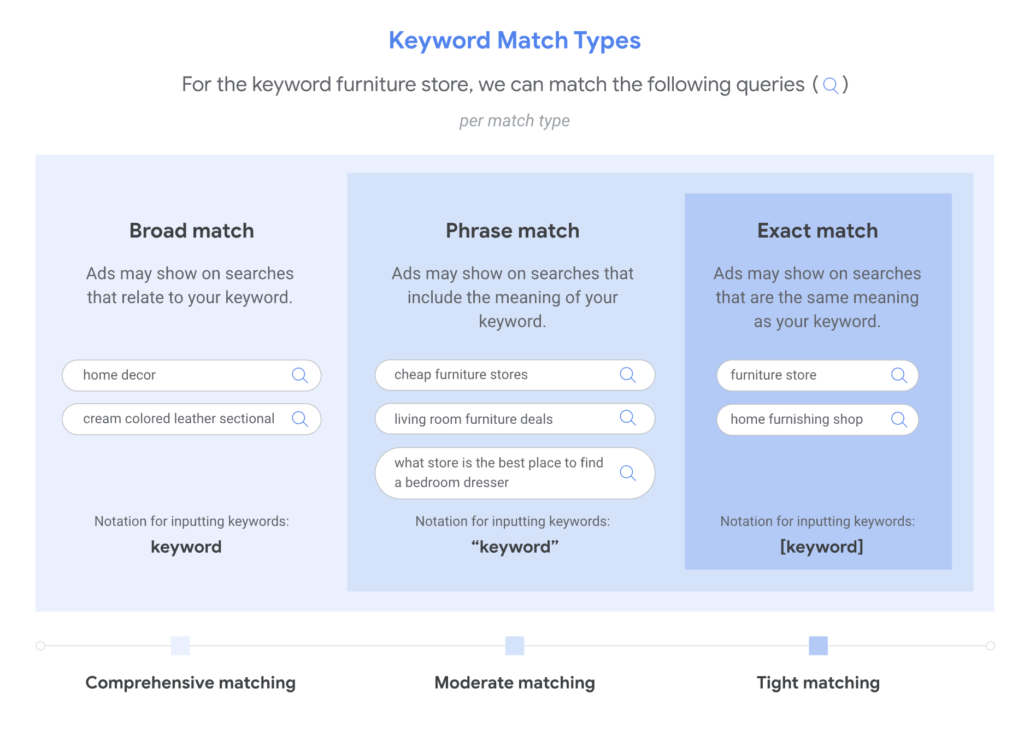
Google Ads has three keyword match types: broad match, phrase match and exact match. Each one gives you a different level of control over which searches can trigger your ads. Let’s look at how each one works.
Broad Match
Broad match allows your ads to show on searches related to your keyword. These can include searches that don’t contain the direct meaning of your keyword, giving you a wider reach and helping you attract more visitors to your website.
To find relevant matches, Google may consider the user’s recent search activity, the content of your landing pages and ad assets, and other keywords in the ad group to better understand the intent behind your keyword.
Think of it as: I know the customer intent I want. Find me other searches that represent that intent.
Broad match offers the most reach and flexibility of the three match types. However, because it can match a wider range of searches, it’s important to monitor your search terms and make sure the traffic is relevant to your business.
Example:
Keyword: women’s trainers
Possible searches:
women’s trainers
buy women’s trainers online
best running shoes for women
comfortable footwear for running
Phrase Match
Phrase match allows your ads to show on searches that include the meaning of your keyword. The meaning can be implied, and the search can be more specific than your original keyword.
With phrase match, you can reach more searches than exact match but fewer than broad match. It offers a balance between reach and control, helping you target searches that remain relevant to the product or service you’re advertising.
Think of it as: I know the general search theme I want.
Example:
Keyword: “women’s trainers”
Possible searches:
women’s trainers
buy women’s trainers online
women’s trainers for running
Exact Match
Exact match allows your ads to show on searches that have the same meaning or intent as your keyword. The search doesn’t have to use exactly the same wording, as Google can match searches with the same meaning or intent.
Of the three match types, exact match gives you the most control over which searches your ads can appear for. However, it generally reaches fewer searches than phrase match and broad match.
Think of it as: I know what I want.
Example:
Keyword: [women’s trainers]
Possible searches:
women’s trainers
trainers for women
ladies’ trainers
Notes
- Google recommends using Smart Bidding with all three match types to optimise towards your campaign goals. While Smart Bidding works with broad match particularly well because of the wider range of searches available for it to learn from, it can also be used with phrase and exact match. Read Google’s guidance on keyword matching options for more details.
- Broader match types cover the searches that narrower match types can cover, plus more. For example, phrase match covers searches that exact match can cover, while broad match covers searches that phrase and exact match can cover, along with other related searches. This means you can reach a wider range of searches using broad match without adding the same keyword separately under all three match types.
- Choosing the right keywords is only part of the process. Your keywords, ad copy and landing pages should all be closely related and match what your potential customers are searching for. This helps you create a relevant experience from the search query to the ad and landing page. Google assesses keyword quality using three factors: expected click-through rate, ad relevance and landing page experience, which are reflected in your keyword’s Quality Score.
How To Build Your Keyword List
1. Think Like your Customer
Think about how your potential customers search for your products or services. What words or phrases would they type into Google? Consider the different ways they might describe what you offer and the terms they would use when they’re ready to buy or looking for a service.
Start by listing your main products or services, then add relevant keywords for each one. Be specific where possible. For example, if you offer a particular service, target keywords that clearly describe that service rather than relying only on general terms.
Specific keywords can help you reach people looking for exactly what you offer, while broader keywords can help you reach a wider audience. The key is to choose relevant keywords that reflect your customers’ searches and match your ads and landing pages.
2. Use Google Keyword Planner
Once you have an initial list of keywords, use Google Keyword Planner to expand and refine it. It’s a Google Ads research tool that helps you discover keyword ideas, understand search demand and estimate advertising costs.
Here’s what you can do with it:
- Discover new keyword ideas: Enter words related to your products or services, or your website, to get relevant keyword suggestions. Keyword Planner also shows estimates for these ideas, helping you expand your list with data rather than relying on guesswork alone.
- Understand keyword metrics: Review the estimated average monthly searches, competition level and estimated costs for your keyword ideas. Use these metrics to compare keywords, understand search demand and identify relevant opportunities. Don’t choose keywords based on search volume alone; a keyword with fewer searches may be more valuable if it better matches what you offer and what your customers are looking for.
- Refine keyword ideas by category: Keyword Planner can group keyword suggestions by themes, brands and other characteristics. You can use these categories to narrow down your list and remove suggestions that aren’t relevant to your business.
- Build and save your keyword list: Select the relevant suggestions and save them to your keyword plan. You can then review and organise your list before deciding which keywords to use in your campaigns.
- Review performance forecasts: For your saved keyword plan, Google can estimate potential clicks, impressions and conversions based on your budget and other campaign settings. Use these forecasts to help plan your campaign and understand the potential results of your keyword choices. Remember that forecasts are estimates, not guarantees of actual performance.
The goal is to build a relevant, well-researched keyword list. Use Keyword Planner’s data to compare your options but always consider how closely each keyword relates to your products or services, your customers’ search intent and your landing pages. Not every suggested keyword will be suitable for your campaign.
For more details, see Google’s guide to using Keyword Planner.
How to Analyse and Optimise Your Keyword List
Once you have your keyword list finalised and your campaigns start running, you need to monitor which search terms are triggering your ads. Google Ads provides two useful tools for this: the Search terms report and Search terms insights.
A keyword is what you add to your campaign to target potential customers. A search term is what someone actually types into Google. These aren’t always the same because Google can match your keywords to related searches, depending on the match type and other signals.
Search Terms Report
The Search terms report shows the searches that triggered your ads and how they performed. It can help you understand whether your keywords are reaching the right audience and identify opportunities to improve your campaigns.
Here’s what you should look for:
- Find irrelevant searches: Check whether your ads are appearing for searches that aren’t relevant to your products or services. If you find irrelevant searches, consider adding them as negative keywords to prevent your ads from showing for those searches in the future.
- Discover new keyword ideas: You may find relevant searches that you haven’t included in your keyword list. Consider adding them as keywords if they align with your products or services and campaign goals.
- Understand keyword matching: Review the Keyword and Match type columns to understand which of your keywords matched a search and which match type was used. This can help you decide whether you need to refine your keyword list or match types.
- Review performance: Look at metrics such as clicks, conversions and conversion value, where available, to understand which searches are contributing to your campaign goals.
Keep in mind that the report doesn’t show every search. Google may omit searches that don’t have enough activity to meet its privacy requirements.
Tip: If the Keyword column isn’t visible in your Search terms report, you can add it through the report’s column settings. This column shows which of your keywords matched the search term.
Search Terms Insights
While the Search terms report helps you investigate individual searches, Search terms insights groups searches into categories and subcategories based on customer intent and the products or services people are looking for.
This helps you understand broader search trends without having to review every individual search term.
You can use Search terms insights to:
- Identify popular search themes: See which categories of searches are bringing traffic to your campaigns and understand what potential customers are looking for.
- Compare performance by theme: Review metrics such as clicks, impressions, click-through rate, conversions and conversion value to identify which search categories are performing well.
- Find opportunities to improve your campaigns: Use the insights to identify relevant themes you could reflect in your ad copy, landing pages or other campaign assets.
The goal is to use search data to make better decisions. Use the Search terms report to investigate individual searches and refine your keyword targeting. Use Search terms insights to understand the bigger picture and identify themes that may offer further opportunities.
Together, these tools help you understand how people find your ads, identify irrelevant traffic and discover ways to improve your campaign performance.
Understand and Improve Your Quality Score
Quality Score is a diagnostic tool in Google Ads that helps you understand how the quality of your ads compares with other advertisers competing for the same searches. It’s measured on a scale of 1 to 10 at the keyword level, with 10 being the highest.
Google calculates Quality Score based on three components:
- Expected click-through rate (CTR): How likely Google estimates people are to click your ad when it appears.
- Ad relevance: How closely your ad matches the intent behind a user’s search.
- Landing page experience: How relevant and useful your landing page is to people who click your ad.
Google rates each component as Above average, Average or Below average. These ratings help you identify which areas may need improvement.
You can find more details in Google’s guide to Quality Score for Search campaigns.
How to Improve Your Quality Score
Rather than focusing on increasing the number itself, use the three components to identify what needs improving.
- Improve your expected CTR: Make your ads more appealing to the people you’re trying to reach. Highlight the benefits of your product or service, make your offer clear and include a relevant call to action. Your ad should give people a good reason to click.
- Improve ad relevance: Make sure your ad copy matches the intent behind your keywords. Group keywords with similar themes together so you can write more relevant ads for each group. If an ad group contains keywords covering very different products or services, consider separating them so your ads can address each theme more closely.
- Improve landing page experience: Make sure the page people reach after clicking your ad delivers what your ad promised. The content should be relevant to their search, easy to navigate and useful to visitors. Also, check that your website works well on mobile devices and loads quickly.
For more detailed recommendations, read Google’s guide to five ways to use Quality Score to improve your performance.
Remember: A higher Quality Score doesn’t automatically mean a more profitable campaign. Google doesn’t use the score itself in the ad auction. Instead, use it to identify weaknesses in your ads, keyword selection and landing pages, then check whether your improvements lead to better results using metrics such as conversions, conversion rate and cost per conversion.