An Advanced Guide to Keywords in Google Ads Search Campaigns
Keywords are words or phrases that you give to Google to tell it what your audience might be searching for. By adding keywords to your campaign, you’re telling Google the kinds of searches you want to target. Depending on the match type you choose, your ads can appear when people search for those keywords or related searches.
Choosing high quality and relevant keywords is very important for your campaigns. Your keywords affect which searches your ads can appear for, what kind of audience you reach, and the intent behind those searches.
The cost of appearing in an ad auction can vary depending on the keyword, the competition in the auction, and several other factors, including the quality and relevance of your ads. You can follow best practices to improve the relevance and quality of your keywords and ads.
Google also gives each keyword a Quality Score from 1 to 10. It’s based on three factors: expected click-through rate, ad relevance and landing page experience. Quality Score helps you understand where your ads could be improved, although the score itself isn’t a direct factor in the ad auction.
Keywords are also used to organise your Search campaigns into ad groups. You group keywords with similar themes together so you can write specific ad copy and use a landing page that’s relevant to the searches you want to target.
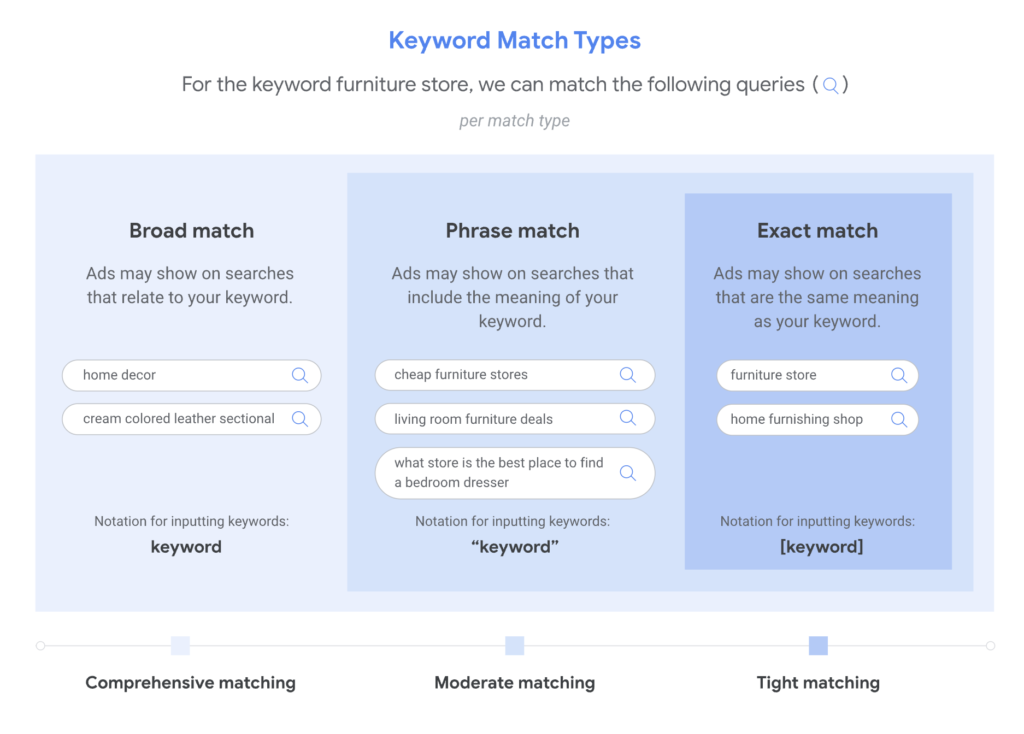
Google Ads has three keyword match types: broad match, phrase match and exact match. Each one gives you a different level of control over which searches can trigger your ads. Let’s look at how each one works.
Broad Match
Broad match allows your ads to show on searches related to your keyword. These can include searches that don’t contain the direct meaning of your keyword, giving you wider reach and helping you discover new opportunities.
To find relevant matches, Google may consider the user’s recent search activity, the content of your landing page and other keywords in the ad group to better understand the intent behind your keyword.
Think of it as: I know the customer intent I want. Find me other searches that represent that intent.
When to use broad match
Broad match is mainly useful for two purposes:
- Discovery: Finding new search terms that could be added as keywords as well as identifying irrelevant searches that may need to be excluded using negative keywords.
- Expanding reach: When you have reliable conversion tracking and sufficient conversion data for Smart Bidding to work effectively, broad match can help you reach additional relevant searches while optimising towards your conversion goals.
Broad match generally works best alongside Smart Bidding strategies, such as Maximise Conversions or Target CPA. However, more traffic doesn’t automatically mean better results. Make sure the additional traffic generates valuable conversions, particularly when your conversion action is a softer action, such as a button click or an enquiry, rather than a completed purchase or qualified lead.
What to keep in mind: Broad match gives Google more flexibility, so regularly review your Search Terms Report to check which searches are triggering your ads. Add negative keywords when necessary to prevent irrelevant traffic and wasted spend. If your campaign has very limited conversion data or unreliable tracking, be cautious about relying heavily on broad match until you have a suitable measurement and bidding strategy in place.
Phrase Match
Phrase match allows your ads to show on searches that include the meaning of your keyword. The meaning can be implied, and searches can be more specific than your original keyword.
Phrase match generally offers a balance between reach and control: it can reach more searches than exact match while providing more focused targeting than broad match.
Think of it as: I know the general search theme I want.
When to use phrase match
Phrase match is a useful starting point for many Search campaigns, particularly when you want to reach relevant searches without giving Google as much flexibility as broad match.
It allows you to target a specific search theme while still reaching variations in wording and searches with additional detail. This makes it useful when launching a new campaign and building an initial understanding of which search terms attract relevant traffic.
What to keep in mind: Phrase match is meaning-based, so don’t assume that every search triggering your ads will be relevant just because it matches the general theme. Review your Search Terms Report regularly, assess conversion performance and add negative keywords where needed.
Exact Match
Exact match allows your ads to show on searches that have the same meaning or intent as your keyword. The wording doesn’t have to be identical because Google can match searches with the same meaning or intent, including eligible close variants.
Of the three match types, exact match generally gives you the most control over which searches your ads can appear for, although it typically reaches fewer searches than phrase match and broad match.
Think of it as: I know what I want.
When to use exact match
Exact match is particularly useful for:
- Proven converting keywords: Search terms that have consistently generated valuable conversions.
- Branded keywords: Searches for your business or brand where you want more focused targeting.
- Validated search terms: Relevant, high-performing queries discovered through your Search Terms Report that you want to target more deliberately.
Exact match can also be useful when you want to bid more aggressively on specific, high-value searches, provided your bidding strategy and campaign structure support that approach.
What to keep in mind: Exact match doesn’t guarantee that your ads will only appear for identical wording. Google can still match eligible close variants with the same meaning or intent. Continue reviewing search terms and performance to ensure that the traffic remains relevant.
Notes
- Google recommends using Smart Bidding with all three match types to optimise towards your campaign goals. While Smart Bidding works with broad match particularly well because of the wider range of searches available for it to learn from, it can also be used with phrase and exact match. Read Google’s guidance on keyword matching options for more details.
- Broader match types cover the searches that narrower match types can cover, plus more. For example, phrase match covers searches that exact match can cover, while broad match covers searches that phrase and exact match can cover, along with other related searches. This means you can reach a wider range of searches using broad match without adding the same keyword separately under all three match types.
- Choosing the right keywords is only part of the process. Your keywords, ad copy and landing pages should all be closely related and match what your potential customers are searching for. This helps you create a relevant experience from the search query to the ad and landing page. Google assesses keyword quality using three factors: expected click-through rate, ad relevance and landing page experience, which are reflected in your keyword’s Quality Score.
How Google Chooses Between Matching Keywords
Your ads can be eligible to appear when one of your keywords matches a person’s search term on Google. However, more than one keyword in your account can be eligible to match the same search term.
This can happen when multiple keywords in your account are eligible to match the same search term and the ads they could trigger lead to the same website domain. The keywords may be in the same or different ad groups or campaigns. These keywords do not compete against each other in the auction. Instead, Google chooses one keyword or ad group to trigger the ad.
Google uses the following order to decide which keyword, ad group or asset group should be considered first:
| Priority | What Google considers |
|---|---|
| 1 | Exact match keywords that are identical to the search term |
| 2 | Phrase match and broad match keywords, including AI Max, that are identical to the search term. Identical PMax search themes can also be considered at this stage. |
| 3 | When no eligible keyword or search theme is identical to the search term, Google uses AI-based relevance to decide which ad groups or asset groups should be considered. It is decided by looking at: the meaning and context of the search term, all the keywords in an ad group, the landing pages used within that ad group |
| 4 | The ad group or asset group with the highest Ad Rank |
Note: In this priority table, “identical” has a narrower meaning than keyword matching. It includes spell-corrected search terms but not plurals or synonyms. Exact, phrase and broad match keywords can still match close variants, including plurals and similar-meaning searches. However, those searches do not receive the special identical-keyword priority shown in the table.
When no eligible keyword or search theme is identical to the search term, Google uses AI-based relevance to decide which ad groups or asset groups should be considered. Only the most relevant ad groups or asset groups are considered for the search. This is why it is important to organise keywords into clear themes and use landing pages that closely match those themes.
Exceptions to the prioritisation rules: Sometimes, a keyword or ad group you expected Google to prioritise may not trigger an ad because it isn’t eligible to serve. For example, if a campaign is limited by budget, Google may restrict how often its ads appear, even when a keyword would otherwise have priority. Other reasons include keywords with low search volume status, disapproved ads or landing pages, and campaign targeting restrictions, such as location or audience settings. The rules also work differently for certain ad formats, such as Shopping ads, and advanced search experiences, such as AI Mode and Google Lens.
For more detail, read Google’s guides on ad group and asset group prioritisation and Ad Rank.
How To Build Your Keyword List
1. Think Like Your Customer
Think about how your potential customers search for your products or services. What words or phrases would they type into Google? Consider the different ways they might describe what you offer and the terms they would use when they’re ready to buy or looking for a service.
Consider different ways people might describe what you offer, including alternative terms, questions and location-specific searches where relevant. If possible, use the language your customers use when speaking to your sales or customer service team.
It’s also important to understand keyword intent: the reason behind a person’s search. Common categories include informational, commercial, navigational and transactional intent. Understanding intent helps you identify which searches are relevant to your business and campaign goals.
2. Use Keyword Research Tools
Once you have an initial list, use keyword research tools to expand and refine it. Tools such as Google Keyword Planner, Semrush and WordStream’s Free Keyword Tool can help you discover keyword ideas and evaluate potential opportunities.
Google Keyword Planner is a free tool within Google Ads. After completing your account setup and providing billing information, you can use it to research keywords for your Search campaigns.
Here’s what you can do with it:
- Discover new keyword ideas: Enter words related to your products or services, or your website, to get relevant keyword suggestions. Keyword Planner also shows estimates for these ideas, helping you expand your list with data rather than relying on guesswork alone.
- Understand keyword metrics: Review the estimated average monthly searches, competition level and estimated costs for your keyword ideas. Use these metrics to compare keywords, understand search demand and identify relevant opportunities. Don’t choose keywords based on search volume alone; a keyword with fewer searches may be more valuable if it better matches what you offer and what your customers are looking for.
- Refine keyword ideas by category: Keyword Planner can group keyword suggestions by themes, brands and other characteristics. You can use these categories to narrow down your list and remove suggestions that aren’t relevant to your business.
- Build and save your keyword list: Select the relevant suggestions and save them to your keyword plan. You can then review and organise your list before deciding which keywords to use in your campaigns.
- Review performance forecasts: For your saved keyword plan, Google can estimate potential clicks, impressions and conversions based on your budget and other campaign settings. Use these forecasts to help plan your campaign and understand the potential results of your keyword choices. Remember that forecasts are estimates, not guarantees of actual performance.
3. Research Your Competitors’ Keywords
Competitor research can help you discover keyword opportunities you may have missed. Look at the products and services your competitors offer, the language they use on their websites and the searches they appear for.
You can start by searching Google for terms relevant to your business and reviewing the ads and organic results that appear. This helps you understand the competitive landscape and identify other businesses targeting similar customers.
You can also use keyword research tools such as Semrush or WordStream’s Free Keyword Tool to investigate competitors’ websites and discover related keyword opportunities. In Google Ads, the Auction Insights report can help you identify advertisers competing with you in the same auctions and compare your performance with theirs.
Use these findings to expand your keyword list but don’t automatically target every keyword a competitor appears for. Check that each term is relevant to your offering, matches your campaign goals and makes sense for your budget.
4. Research Negative Keywords
Keyword research isn’t just about finding searches you want to target. It’s also about identifying searches you want to avoid.
Think about terms that could attract people who aren’t looking for your products or services. For example, if you offer paid services, searches containing words such as jobs, careers or training may be irrelevant, depending on what you sell.
You can identify potential negative keywords by brainstorming irrelevant search themes, reviewing Google search suggestions and examining the Search Terms Report in Google Ads. The report shows actual searches that have triggered your ads, helping you identify irrelevant queries and recurring patterns that could waste your budget.
Add negative keywords where appropriate to prevent your ads from appearing for irrelevant searches. Choose the negative keyword and match type carefully, as negative keywords work differently from positive keywords and don’t automatically exclude all close variants.
For more details, see Google’s guide to finding negative keyword ideas using the Search Terms Report.
The goal is to build a relevant, well-researched keyword list. Use Keyword Planner’s data to compare your options but always consider how closely each keyword relates to your products or services, your customers’ search intent and your landing pages. Not every suggested keyword will be suitable for your campaign.
For more details, see Google’s guide to using Keyword Planner.
How to Analyse and Optimise Your Keyword List
Once you have your keyword list finalised and your campaigns start running, you need to monitor which search terms are triggering your ads. Google Ads provides two useful tools for this: the Search terms report and Search terms insights.
A keyword is what you add to your campaign to target potential customers. A search term is what someone actually types into Google. These aren’t always the same because Google can match your keywords to related searches, depending on the match type and other signals.
Search Terms Report
The Search terms report shows the searches that triggered your ads and how they performed. It can help you understand whether your keywords are reaching the right audience and identify opportunities to improve your campaigns.
Here’s what you should look for:
- Find irrelevant searches: Check whether your ads are appearing for searches that aren’t relevant to your products or services. If you find irrelevant searches, consider adding them as negative keywords to prevent your ads from showing for those searches in the future.
- Discover new keyword ideas: You may find relevant searches that you haven’t included in your keyword list. Consider adding them as keywords if they align with your products or services and campaign goals.
- Understand keyword matching: Review the Keyword and Match type columns to understand which of your keywords matched a search and which match type was used. This can help you decide whether you need to refine your keyword list or match types.
- Review performance: Look at metrics such as clicks, conversions and conversion value, where available, to understand which searches are contributing to your campaign goals.
Keep in mind that the report doesn’t show every search. Google may omit searches that don’t have enough activity to meet its privacy requirements.
Tip: If the Keyword column isn’t visible in your Search terms report, you can add it through the report’s column settings. This column shows which of your keywords matched the search term.
Search Terms Insights
While the Search terms report helps you investigate individual searches, Search terms insights groups searches into categories and subcategories based on customer intent and the products or services people are looking for.
This helps you understand broader search trends without having to review every individual search term.
You can use Search terms insights to:
- Identify popular search themes: See which categories of searches are bringing traffic to your campaigns and understand what potential customers are looking for.
- Compare performance by theme: Review metrics such as clicks, impressions, click-through rate, conversions and conversion value to identify which search categories are performing well.
- Find opportunities to improve your campaigns: Use the insights to identify relevant themes you could reflect in your ad copy, landing pages or other campaign assets.
The goal is to use search data to make better decisions. Use the Search terms report to investigate individual searches and refine your keyword targeting. Use Search terms insights to understand the bigger picture and identify themes that may offer further opportunities.
Together, these tools help you understand how people find your ads, identify irrelevant traffic and discover ways to improve your campaign performance.
Understand and Improve Your Quality Score
Quality Score is a diagnostic tool in Google Ads that helps you understand how the quality of your ads compares with other advertisers competing for the same searches. It’s measured on a scale of 1–10 at the keyword level, with 10 being the highest.
Google calculates Quality Score based on three components:
- Expected CTR: How likely people are to click your ad when it appears based on the historical performance.
- Ad relevance: How well your keywords align with your ad copy.
- Landing page experience: How relevant, useful and easy to use your landing page is for people who click your ad. eg: page speed and content alignment with your keywords and ad
Google rates each component as Above average, Average or Below average, based on comparisons with other advertisers whose ads showed for the same searches over the previous 90 days. These ratings help you identify which areas may need improvement.
You can find more details in Google’s guide to Quality Score for Search campaigns.
Why Does Quality Score Matter?
Ad quality can affect your competitiveness in the ad auction. When your ads and landing pages provide a more relevant and useful experience, you may be able to achieve better ad positions and pay less for clicks than you otherwise would.
However, Quality Score itself isn’t used directly in the ad auction. It’s a diagnostic indicator of the underlying quality factors that can influence auction outcomes. A higher score doesn’t guarantee a lower cost per click, a better position or more conversions.
What Is a Good Quality Score to Aim For?
There is no universal target for Quality Score. What’s considered good depends on the type of keyword you’re targeting, your strategy and your campaign’s overall performance.
As a general guideline, WordStream suggests interpreting scores as follows:
- 7–10: Excellent. These are very strong scores. Achieving a perfect 10 can be difficult, so a score of 7 or above is a good result.
- 4–6: Good. This isn’t just average; WordStream considers this range good and most keywords will fall within it.
- 1–3: Low. These scores may indicate areas that need improvement. However, don’t let a low Quality Score distract you from other important metrics, such as CPC and conversion rate. If a keyword has a low score but is meeting your cost or conversion goals, it may be fine to leave it as it is.
These ranges are guidelines, not official Google benchmarks or strict performance targets.
Quality Score also depends on the type of keyword you’re targeting. Your own brand keywords may have a higher Quality Score because your ads and landing pages are likely to be closely related to the brand people are searching for. In contrast, competitor brand keywords may have a lower Quality Score because your ads and landing pages may be less relevant to people searching for another brand. This is why you should assess Quality Score in context rather than expecting every keyword to achieve the same score.
You can also check industry benchmarks for metrics such as CTR, CPC, conversion rate and cost per lead to understand how your campaign compares with others in your industry. Use these benchmarks alongside your own performance data before deciding whether to change or pause a keyword.
Remember: Don’t chase a higher Quality Score just for the sake of it. Use it to understand potential weaknesses in your ads, keywords and landing pages and prioritise improvements that support your campaign goals.
How to Improve Your Quality Score
Rather than focusing only on increasing the number, use the three components to identify what needs improving.
1. Improve your expected CTR
Make your ads more appealing to the people you’re trying to reach. Highlight the benefits of your product or service, communicate your offer clearly and include a relevant call to action. Your ad should give users a compelling reason to click.
Review your Search Terms Report to understand what people are searching for and whether your ads align with their intent. Test different headlines, descriptions and offers where appropriate, then evaluate the results using CTR and conversion performance.
2. Improve ad relevance
Make sure your ad copy matches the intent behind your keywords. Group related keywords together where this helps you write more relevant ads for each theme.
For example, if you’re advertising early pregnancy scans and 4D bonding scans, consider whether each service needs its own ad group and tailored messaging. Someone searching for an early pregnancy scan should see an ad that addresses that need rather than a generic ad focused on a different service.
The goal isn’t simply to create more ad groups. It’s to make sure your keywords, ads and landing pages work together to meet the user’s needs.
3. Improve landing page experience
Make sure the page people reach after clicking your ad delivers what your ad promised. The content should be relevant to their search, easy to navigate and useful to visitors.
Check that the page answers important questions, provides clear information about the service or product, and makes the next step straightforward. Also, ensure your website works well on mobile devices and loads quickly.
For example, if your ad promotes early pregnancy scans, send users to a relevant early pregnancy scan page rather than a generic page covering unrelated services.
Practical Tips for Improving Quality Score
- Review your keyword selection regularly. Make sure you’re targeting relevant searches that align with your products, services and landing pages.
- Keep your account structure purposeful. Organise related keywords into appropriate ad groups so you can create relevant ads and direct users to suitable landing pages. Restructuring alone won’t improve Quality Score unless it improves the experience or relevance.
- Test your ad copy. Experiment with headlines, descriptions, benefits and calls to action to discover what resonates with your audience.
- Review your landing pages. Check relevance, usefulness, mobile usability, page speed and the clarity of your calls to action.
- Monitor business performance. Use metrics such as conversions, conversion rate, CPA and ROAS to assess whether your improvements are actually helping the campaign.
For more detailed recommendations, read Google’s guide to five ways to use Quality Score to improve your performance.
Key takeaway: Quality Score helps you diagnose potential weaknesses in your keywords, ads and landing pages. Use it to identify opportunities to improve relevance and the user experience but judge success by whether those improvements help you achieve your business goals.